Tools · Citation checking
CITECHECK
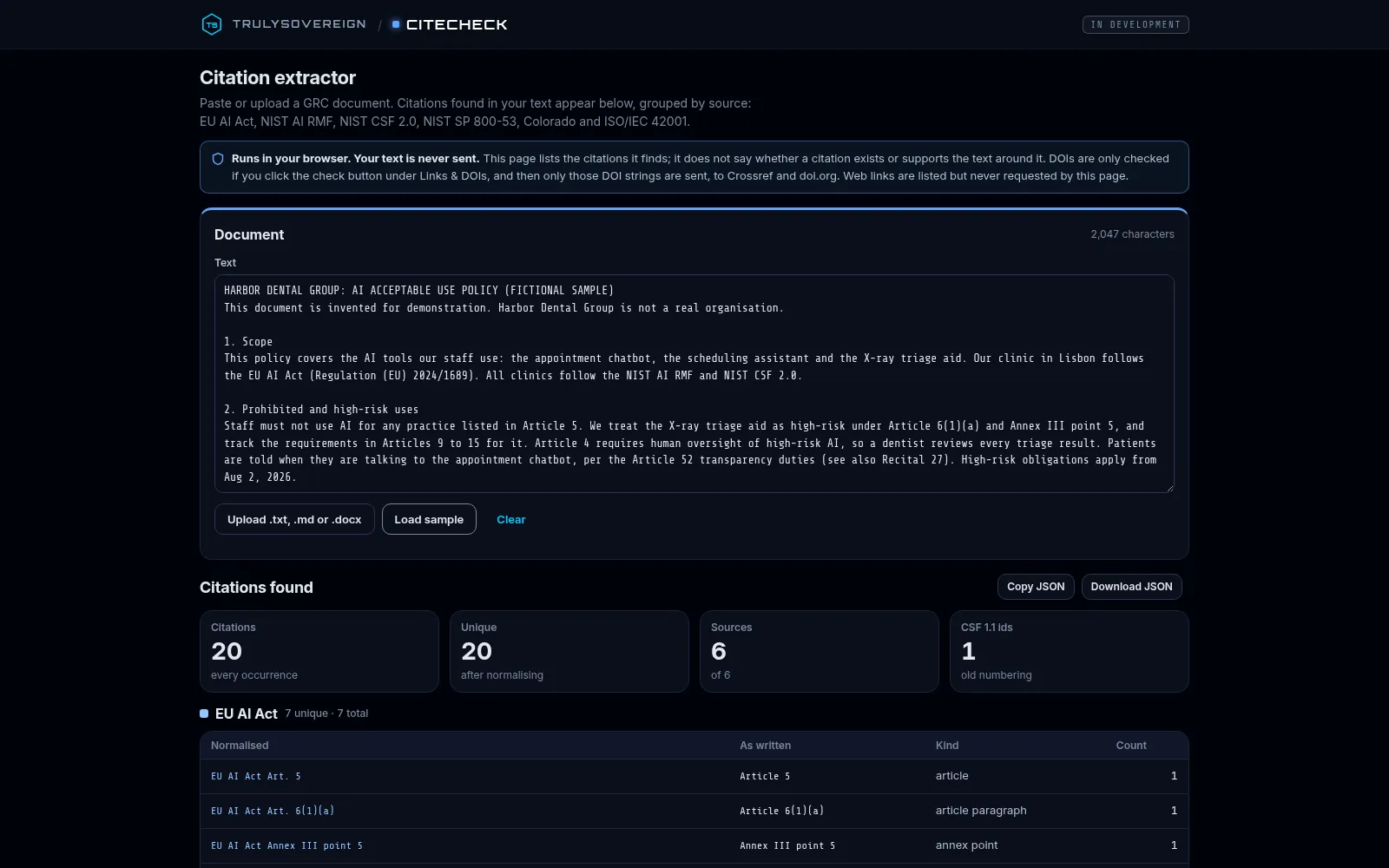
CITECHECK finds the regulatory and framework citations in a GRC document, in your browser, lists them grouped by source, and checks whether each one exists in a version-pinned copy of its source.
Early access, in development. Live today: the citation extractor, the existence check against version-pinned copies of each source, the NIST SP 800-171 Rev 2 → Rev 3 crosswalk and migration summary, and DOI lookups you start with a click. The support judge and report are coming, not live.
What it is
A citation extractor and existence check for GRC documents. Paste text, upload a .txt, .md or .docx file, or load a sample, and the citations it finds appear grouped by source: EU AI Act, NIST AI RMF, NIST CSF 2.0, NIST SP 800-53, Colorado, ISO/IEC 42001, NIST SP 800-171 and CMMC Level 2.
Each citation is looked up in a version-pinned copy of its source: found (the clause text is shown), not found, superseded (with the current equivalent) or, for ISO/IEC 42001, exists only (numbers and titles, no ISO text). Every result names the corpus file and its hash.
Runs in your browser. Your text is never sent. It checks whether a citation exists in its source; it does not yet say whether a citation supports the text around it.
Why it exists
AI-written compliance documents cite regulations and frameworks. CITECHECK is being built to check whether those citations exist and say what they’re cited for.
The early-access tool does the first part today: it lists the citations it finds and checks whether each one exists in the source it names. Whether a clause backs up the sentence that cites it is a separate check, not built yet.
How it works · live steps, then what’s coming
How it works
Steps 1 to 4 are live in the early-access tool. Step 5 is coming, not live.
- Step 1
Paste or upload
Paste text, upload a .txt, .md or .docx file, or load a sample. The text stays in your browser.
- Step 2
Extract
Citations are found and grouped by source, counted, and marked in the text. Old CSF 1.1 identifiers are flagged, and CMMC Level 2 IDs such as AC.L2-3.1.1 are recognised.
- Step 3
Existence check
Each citation is looked up in a version-pinned copy of its source: found, not found, superseded (with the current equivalent) or, for ISO/IEC 42001, exists only. Every result names the corpus file and its hash. NIST SP 800-171 Rev 2 citations get a Rev 2 → Rev 3 crosswalk (NIST data) and a counts-only migration summary.
- Step 4
Check DOIs, on click
Only if you click the check button: only the DOI strings are sent, to Crossref and doi.org. Web links are listed but never requested.
- Step 5
Support judge and report · coming
Not live. Judge whether a cited clause backs up the sentence that cites it, and report the results.
No accuracy or error rate is claimed. A found result means the citation exists in that copy of its source, not that it is cited correctly.
Real pixels, dated
Inside CITECHECK
What you can check
A dash means not measured, not zero.
- Sources it extracts
- 8EU AI Act, NIST AI RMF, NIST CSF 2.0, NIST SP 800-53, Colorado, ISO/IEC 42001, NIST SP 800-171, CMMC Level 2
- Existence check
- LiveVersion-pinned copy of each source; every result names its corpus file and hash
- Support judge and report
- —Coming, not live
- Accuracy or error rate
- —None claimed
What’s real, and what isn’t claimed
Real today
- The public tool: paste or upload a document and see the citations it finds, grouped by source and marked in the text.
- The existence check: each citation is looked up, in your browser, in a version-pinned copy of its source and shown as found (with the clause text), not found, superseded (with the current equivalent) or, for ISO/IEC 42001, exists only (numbers and titles, no ISO text).
- Every result names the corpus file and its hash. The Sources list shows each corpus file’s version, retrieval date, source, licence and hash.
- NIST SP 800-171 and CMMC Level 2: a Rev 2 → Rev 3 crosswalk from NIST data, a counts-only Rev 2 → Rev 3 migration summary from NIST’s change analysis, and CMMC Level 2 IDs checked against the CMMC Level 2 assessment guide (IDs and short names).
- Runs in your browser. Your text is never sent. DOIs are only checked if you click the check button, and then only those DOI strings are sent, to Crossref and doi.org. Web links are listed but never requested.
- The citations found can be copied or downloaded as JSON.
Not claimed
- It does not say whether a citation supports the text around it. The support judge and report are coming, not live.
- A found result means the citation exists in that version-pinned copy of its source. It does not mean the citation is used correctly.
- No accuracy or error rate is claimed.
Questions
Is my document sent anywhere?
Runs in your browser. Your text is never sent. DOIs are only checked if you click the check button, and then only those DOI strings are sent, to Crossref and doi.org. Web links are listed but never requested.
Which citations does it find?
EU AI Act, NIST AI RMF, NIST CSF 2.0, NIST SP 800-53, Colorado, ISO/IEC 42001, NIST SP 800-171 and CMMC Level 2 citations. Old CSF 1.1 identifiers are flagged.
Does it check that a citation is right?
It checks that each citation exists in a version-pinned copy of its source: found, not found, superseded or, for ISO/IEC 42001, exists only. It does not yet check whether the cited clause supports the text around it; that support judge, and a report, are coming.
What does it do with NIST SP 800-171 and CMMC Level 2?
Rev 2 requirements are shown with their Rev 3 equivalents from NIST’s crosswalk, and a sentence that says Rev 3 but uses Rev 2 numbering is flagged. A counts-only migration summary, from NIST’s change analysis and the Rev 3 catalog, counts the requirements cited by NIST change type, the Rev 3 requirements reached and the organization-defined parameters to set. CMMC Level 2 IDs such as AC.L2-3.1.1 are checked against the CMMC Level 2 assessment guide.
Other tools
RADAR
AI platform changes, explained, with corrections
Explore RADAR In active developmentJCR
Checkpoint and receipts for agent actions
Explore JCR Public alphaCCP Study Lab
Learn to investigate a security claim
Explore CCP Study LabDiscuss the evidence you need.
The same discipline behind these tools, applied to your systems.